
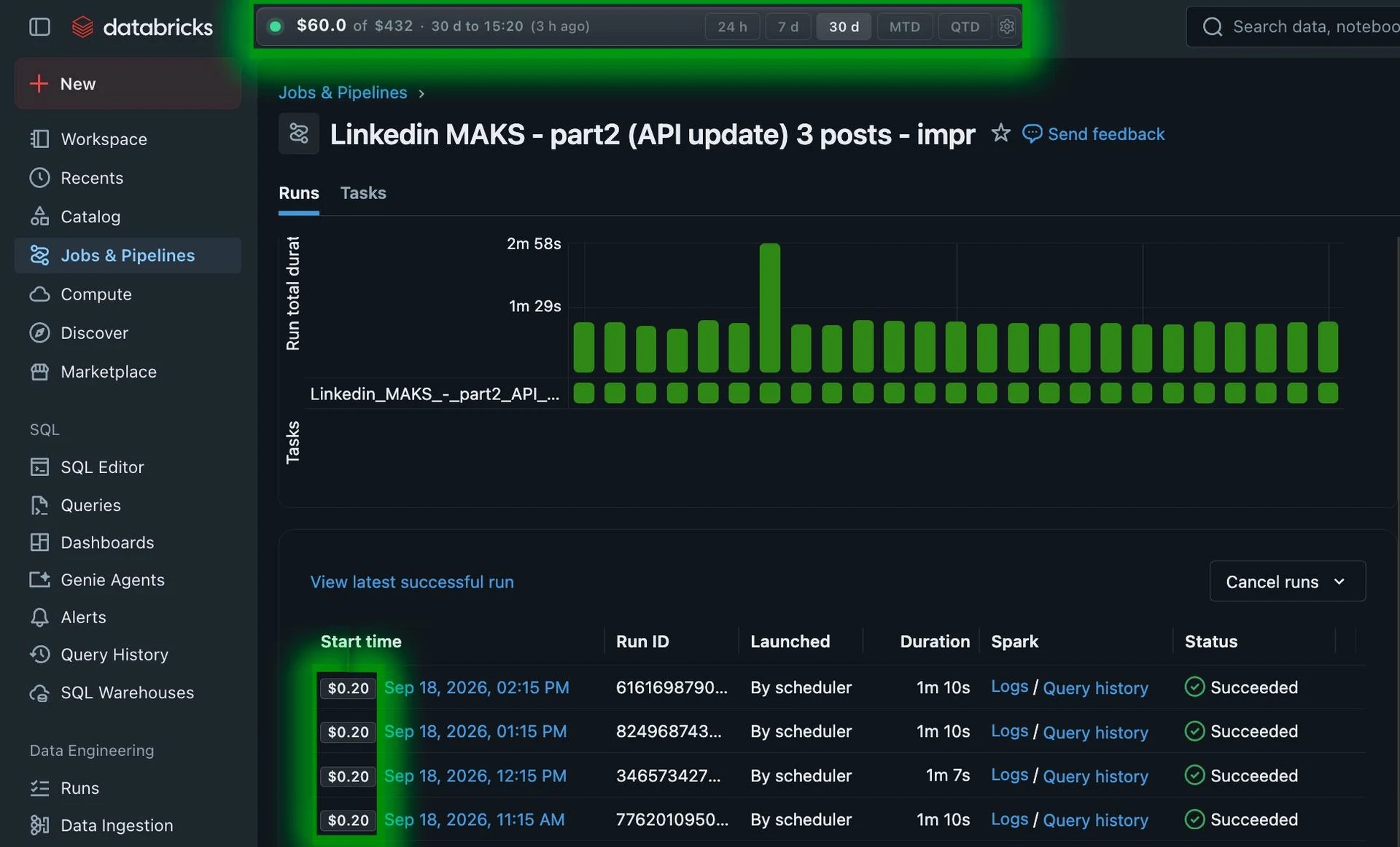
What does cost per job run tell you?
It helps you find executions to investigate. Look at the data processed, compute configuration and any retries before deciding why a run cost more.
A failed execution can still consume compute. Review failed or repaired runs when explaining a job’s total. Databricks provides billing queries for run costs and failures.
Reference rates behind a job run
A run is billed according to its selected job compute model and consumed DBUs.
| Compute model | Cloud | Cloud infrastructure | Published compute rates |
|---|---|---|---|
| Jobs Classic clusters | AWS, Azure, GCP | ≈ $0.10-$1.00+ / VM hour | $0.15 / DBU |
| Jobs Serverless | AWS, Azure, GCP | Included in DBU rate | $0.35 / DBU |
The total for a run depends on its DBU usage and compute model. Public reference rates checked Oct 6, 2026.
Prices shown for US East (AWS us-east-1)View official Databricks pricing.
How to compare two job runs
- Connect FinOpsWay, open Jobs & Pipelines and select a job.
- Open Runs and read the cost badges beside the execution start times.
- Compare runs with similar input data. Check duration, status and billing freshness for both.
Example: The screenshot shows several runs at $0.20 each. That is a recorded example, not a standard job price. A longer run deserves investigation, but duration alone does not prove wasted spend.
Common questions
Why is the latest run cost incomplete?
A run can finish before its billing records arrive. Databricks billing is delayed by several hours. Recheck the run after the reporting window includes it.
Can I divide cluster cost by the number of runs?
That gives an equal split, not measured cost per run. Runs can differ in duration and compute use. Shared clusters can also serve unrelated work.
Billing can lag by several hours. Check the reported period and freshness. How FinOpsWay calculates costs.
Add FinOpsWay to your browser
Install the free extension from your browser’s store. No FinOpsWay account is required.
 Available for
Google Chrome
Get the extension
Available for
Google Chrome
Get the extension
 Available for
Microsoft Edge
Get the extension
Available for
Microsoft Edge
Get the extension
 Available for
Mozilla Firefox
Get the extension
Available for
Mozilla Firefox
Get the extension
Microsoft Edge uses the Chrome Web Store listing.