
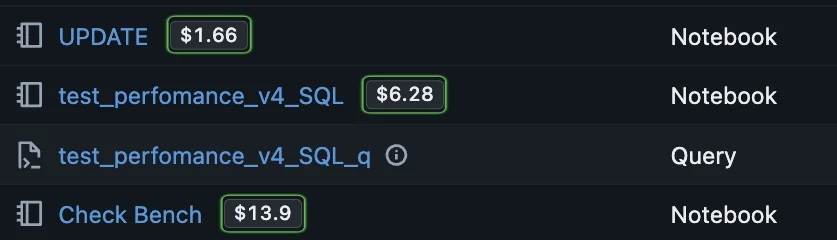
Where do notebook costs come from?
Check the compute used to run the notebook. With serverless compute, Databricks manages the machines and billing records can identify the notebook. With a shared all-purpose cluster, several notebooks can use the same machines.
Databricks explains how to find notebook usage in its serverless billing documentation. Shared cluster spending needs an allocation rule before you assign it to individual users or notebooks.
Reference rates for notebook compute
Notebook compute follows the selected compute model. These Databricks list rates are in USD per DBU.
| Compute model | Cloud | Cloud infrastructure | Published compute rates |
|---|---|---|---|
| Classic all-purpose cluster | AWS, Azure, GCP | ≈ $0.10-$1.00+ / VM hour | $0.55 / DBU |
| Classic job cluster | AWS, Azure, GCP | ≈ $0.10-$1.00+ / VM hour | $0.15 / DBU |
| Databricks SQL warehouse | AWS, Azure, GCP | ≈ $0.10-$1.00+ / VM hour | $0.22 / DBU |
| Serverless SQL | AWS, Azure, GCP | Included in DBU rate | $0.22 / DBU |
| Serverless compute | AWS, Azure, GCP | Included in DBU rate | $0.75 / DBU |
Public reference rates checked Oct 6, 2026. Shared clusters can run several notebooks, so these are compute rates, not a per-notebook price.
Prices shown for US East (AWS us-east-1)View official Databricks pricing.
How to review notebook spending
- Connect FinOpsWay and open the workspace list containing your notebooks.
- Find the cost badge beside the notebook name and check the reporting period.
- Open the notebook to review its compute and workload. Compare experiments with similar data and complete billing.
Example: Running an experiment ten times can raise its total even if one execution is unchanged. Check how often you ran it before concluding that a code edit made it less efficient.
Common questions
Does the badge show the cost of each cell?
No. A notebook total is not a bill for each cell or SQL statement. Do not treat it as exact per-cell attribution.
Why can a notebook and a cluster show different costs?
A cluster can also run other notebooks or jobs. Its total covers the compute resource, while notebook attribution depends on the available usage records.
Billing can lag by several hours. Check the reported period and freshness. How FinOpsWay calculates costs.
Add FinOpsWay to your browser
Install the free extension from your browser’s store. No FinOpsWay account is required.
 Available for
Google Chrome
Get the extension
Available for
Google Chrome
Get the extension
 Available for
Microsoft Edge
Get the extension
Available for
Microsoft Edge
Get the extension
 Available for
Mozilla Firefox
Get the extension
Available for
Mozilla Firefox
Get the extension
Microsoft Edge uses the Chrome Web Store listing.